How Pokechill Auto Repeat Works: Set Up a Safe Loop
Set a repeatable route, check catches and storage, and test a Pokechill auto repeat loop before leaving the game unattended.

Does Pokechill Have Auto Repeat or Auto Play?
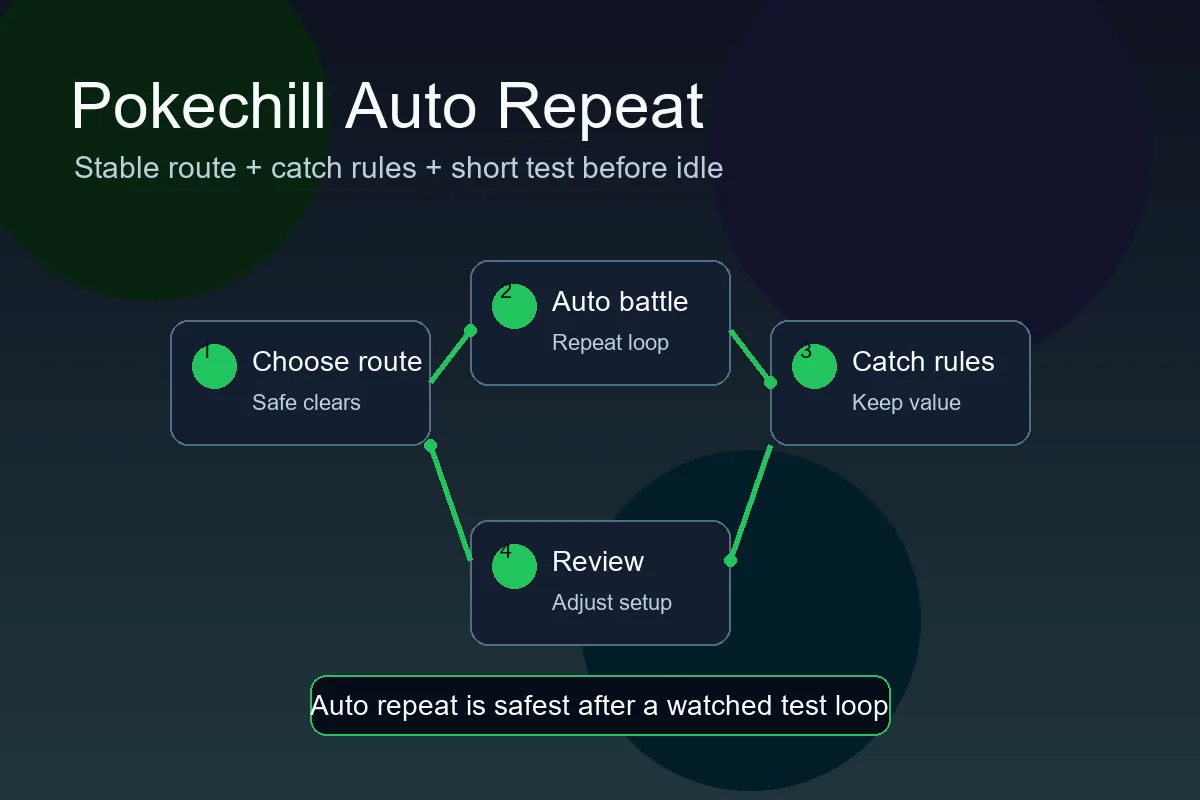
Yes, Pokechill uses automatic battles and idle-friendly repeat loops. That is why players search for terms such as Pokechill auto repeat, does Pokechill have auto play, and auto repeat Pokechill. The important detail is that the game can repeat actions only as well as your current setup allows. If your team is underpowered, your catch rules are messy, or your route is too hard, automation repeats the problem instead of solving it.
Treat auto play as a consistency tool. It keeps stable battle loops moving while you make the strategic choices: which route to farm, which Pokemon leads, which catches are worth keeping, when to evolve, and when to spend rare resources. If you want faster progress, pair this page with the Pokechill Faster Guide; if you need mechanics lookup, use the Pokechill Wiki and the full Game Guide.
Automatic battles
Battles can continue in a repeatable loop, so you do not need to click every attack manually.
Player decisions
You still choose the route, team order, upgrades, catches, and evolution plan.
Stable route required
A route that causes fainting or slow clears is a poor auto repeat target.
Review matters
Check results after a short test before trusting a long idle session.
Auto Repeat Settings to Check Before You Idle
Before you leave Pokechill running, slow down for one setup pass. Most bad auto repeat sessions are caused by one preventable mistake: the wrong lead Pokemon, a route that looked possible but was not stable, a catch rule that fills storage with weak targets, or a resource plan that spends on Pokemon you did not mean to build.
Use the table below as a pre-idle checklist. The exact labels can change with patches, so trust the in-game interface first, then use this guide as a decision framework.
| Setting or Choice | Best Use | What to Check |
|---|---|---|
| Battle route | Farm the highest route your team clears repeatedly. | If the route needs constant healing or manual rescue, move one step lower. |
| Lead Pokemon | Put the most reliable matchup first. | Do not lead with a weak Pokemon only because you want it to gain levels. |
| Catch behavior | Keep catches aligned with your current goal. | Avoid filling storage with low-value duplicates when you are farming overnight. |
| Evolution plan | Know which Pokemon should evolve soon. | Compare your plan with the <a href="/evolution/">Evolution Chart</a> before spending. |
| Resource spending | Save rare upgrades for Pokemon with a clear role. | Do not let auto play encourage random upgrades just because resources appeared. |
How to Build a Safe Pokechill Auto Repeat Loop
The best auto repeat loop is boring in a good way. Your team wins at a steady rhythm, storage does not fill too quickly, the lead Pokemon does not faint against common encounters, and the rewards match your current goal. That goal might be experience, IV candidates, shiny checks, evolution levels, or resource farming.
Start by choosing one purpose. A leveling loop should favor reliable experience and quick clears. A catch loop should favor useful encounter pools and enough storage space. A shiny or IV loop should favor repeated encounters while protecting the Pokemon you already plan to keep.
- Pick one goal. Decide whether this session is for experience, catches, shiny checks, IV candidates, or resources.
- Choose the safest strong route. Use a route your team clears cleanly, not the hardest route it barely survives.
- Watch a five-minute sample. Look for fainting, slow matchups, storage pressure, and whether rewards match the goal.
- Adjust one thing at a time. Change route, lead, or catch behavior separately so you know what improved the loop.
- Review after a milestone. Retest after evolution, a major upgrade, or a new team member.
Auto repeat rule
If a loop is unstable while you are watching it, it will not become stable when you walk away. Fix the route or team before relying on idle time.
Can You Leave Pokechill on Auto Repeat Overnight?
You can use Pokechill as an idle game, but overnight play should be conservative. A perfect active route is not always a safe overnight route. The longer you leave the game running, the more important stability becomes. A slightly easier route that keeps producing for hours is usually better than a harder route that stalls after a few bad matchups.
For deeper overnight planning, compare this page with the speed and overnight guide. That guide focuses on progression speed, while this page focuses on keeping auto repeat clean and predictable.
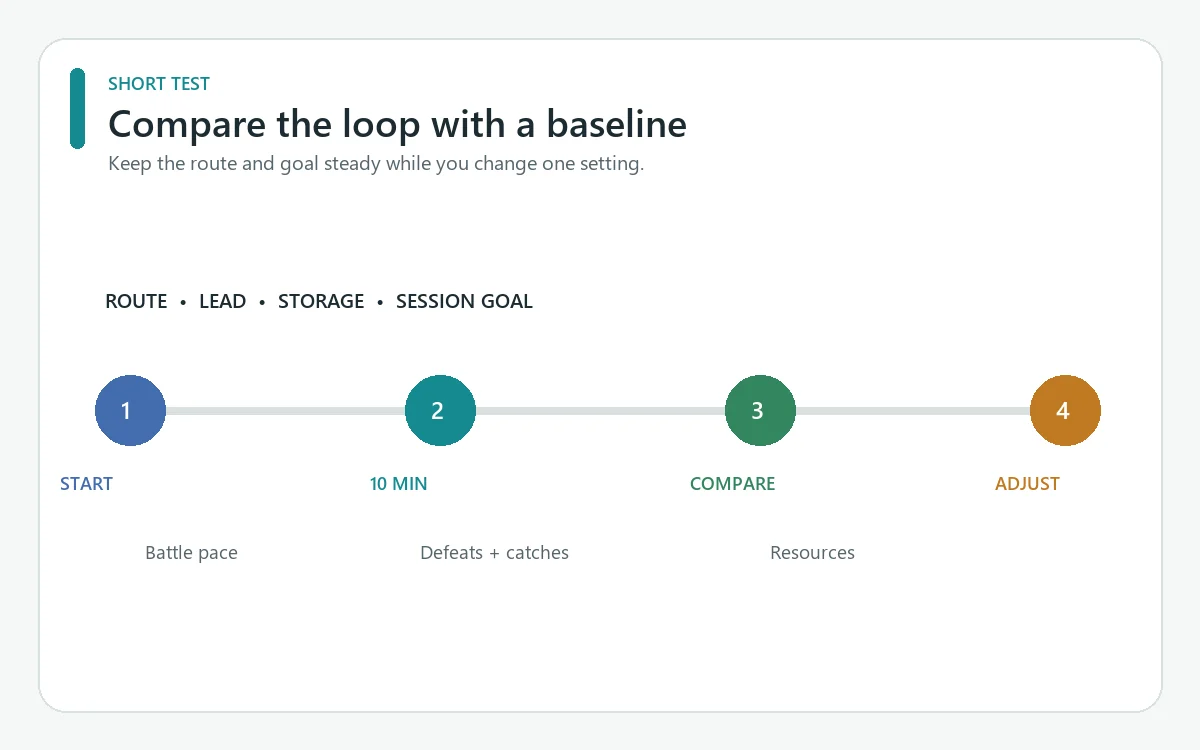
Before a long session, run the loop for about ten minutes while you can still watch it. Note the starting route, lead Pokemon, storage space, and one goal such as experience or useful catches. After the test, compare battle pace, defeats, catches, and resource changes with that baseline. Change one setting at a time so you can tell what helped.
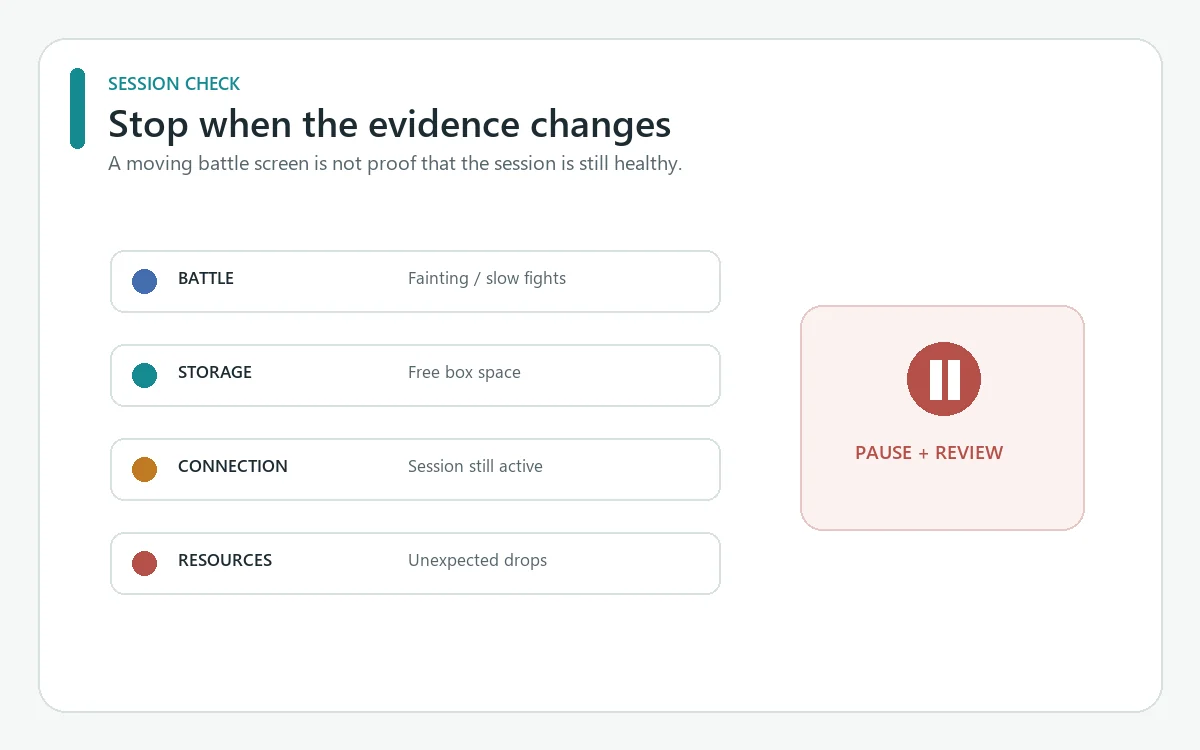
A short test cannot guarantee an overnight result: later matchups, a full box, a disconnected session, or a game update can change what happens. If the loop stalls, fills storage, or spends resources differently than expected, stop and adjust the route or catch rules. Do not assume progress continues while the game is closed; verify the current game behavior and session state first.
| Question | Answer | Best Action |
|---|---|---|
| Should I use my hardest unlocked route? | Not by default. | Use the hardest route that stays stable during a short test. |
| Can auto repeat fix weak team coverage? | No. | Add a coverage partner or farm one route lower until the matchup improves. |
| Should I test before sleep? | Yes. | Run the loop for five to ten minutes and check fainting, rewards, and storage. |
| What should I review in the morning? | Levels, catches, drops, storage, and bottlenecks. | Use the result to decide whether to push harder or stay stable. |
| The loop changed after an evolution | A new move or matchup can alter battle pace. | Repeat the short test after a major team change before leaving the game unattended. |
| Storage filled during the test | The catch rule may be broader than the session goal. | Review IVs and useful candidates, then narrow the rule before restarting. |
Why Your Pokechill Auto Play Feels Slow
The route is too hard
Repeated fainting, long battles, or frequent stalls usually mean the route is not ready for auto repeat. Drop down and build strength first.
Your lead Pokemon is wrong
A lead with poor matchups can make every repeat cycle slower. Put the most reliable clearer first, then train weaker Pokemon when the loop can support them.
You are mixing goals
Trying to level, catch everything, farm resources, and test new Pokemon in one idle loop makes results hard to judge. Pick one goal per session.
Storage or catch rules are ignored
Auto repeat can create clutter if you keep every weak duplicate. Review catches regularly and save space for useful IVs, shiny Pokemon, and team candidates.
You are skipping evolution checks
Evolution can change the best route and team role. Use the Evolution Chart after major level milestones.
What Auto Repeat Cannot Do for You
Auto repeat cannot choose the best Pokemon investment, identify your long-term team plan, or know when a rare catch deserves resources. It also cannot replace reading in-game tooltips after a patch. Use automation for repetition, but keep decisions manual when they affect IVs, Genetics, shiny value, evolution timing, or rare resources.
Avoid unsafe shortcuts, cheats, third-party scripts, and browser automation that breaks the game rules. They can corrupt progress, create unfair advantages, or violate the site's terms. A clean Pokechill setup is simple: use the game interface, choose a stable loop, and improve the team with normal progression.
Sources and Related Pokechill Resources
This guide is based on the current Pokechill resource set on this site: the Game Guide, Wiki, Faster Guide, Evolution Chart, Tier List, and Shiny Guide. It explains auto repeat as a player workflow rather than a promise that every account has the same settings or results.
For current live mechanics, compare your in-game interface with public reference material such as the PokeChill Game Guide. If the game UI changes after an update, the in-game labels and tooltips should take priority.
Frequently Asked Questions
Last updated: September 28, 2026